Email Infrastructure
Building Reliable Email Infrastructure for Small Teams
A practical checklist for SPF, DKIM, and DMARC checks when setting up Google Workspace.
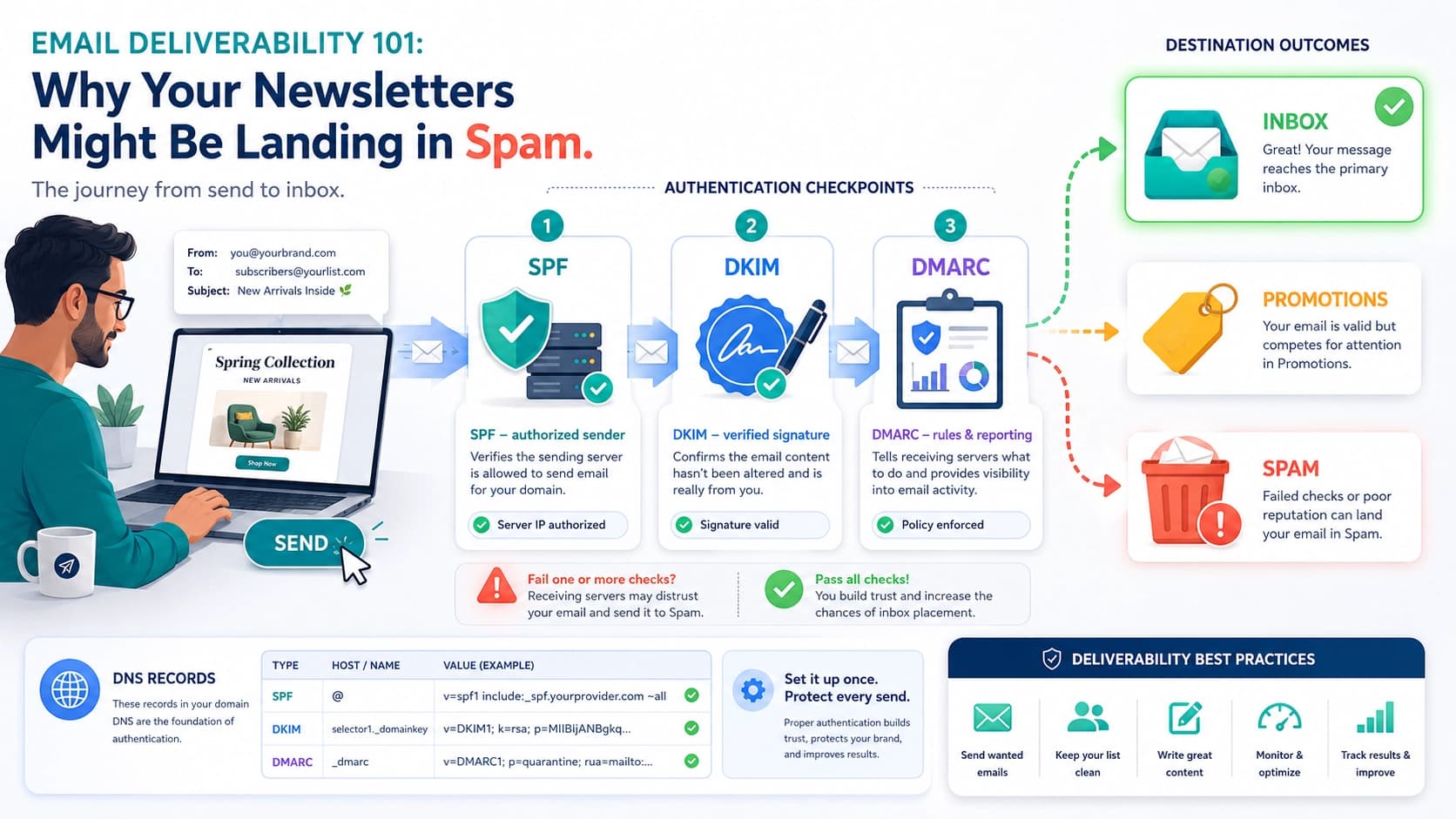
When a small team moves its email to Google Workspace, one of the biggest surprises is usually email deliverability.
You send an important email to a customer, wait for a reply... and later discover that your email never reached their inbox. Or worse, it went straight to spam. 😅
That can be frustrating, especially when email is an important part of your business.
Today, I’m going to explain a few technical things you can do to improve your business email deliverability — without making this too technical.
1. Make sure your MX records are correct
Think of an MX record like the address on your mailbox.
It tells the internet:
“Emails for this domain should be delivered here.”
If you use Google Workspace, your domain needs to point incoming email to Google's mail servers correctly.
Wrong or missing MX records = email problems.
Simple enough. 📬
2. Set up SPF
SPF is basically a guest list for your domain.
It tells receiving mail servers which services are allowed to send email using your domain.
For example, maybe you send email using:
- Google Workspace
- A CRM
- A newsletter platform
- A support system
Your SPF record should properly include the services that are allowed to send on your behalf.
One important rule: you should normally have one SPF record, not several separate SPF records.
You can quickly check it with:
dig +short TXT yourdomain.com | tr -d '"' | grep '^v=spf1'
Don't worry if that command looks scary. 😄
There are also plenty of online DNS-checking tools that can show the same information.
3. Enable DKIM
DKIM is like putting a digital signature on every email you send.
It helps the receiving mail server confirm:
“Yes, this email really came from this domain, and nobody changed it along the way.”
Google Workspace can generate the DKIM key for you. You then add the provided record to your domain's DNS and enable DKIM signing from Google Workspace.
Another small DNS change, but a very useful trust signal. ✅
4. Set up DMARC
DMARC is the manager watching SPF and DKIM.
It tells receiving mail providers what they should do when an email claiming to be from your domain fails authentication.
If you're setting it up for the first time, don't immediately tell mail providers to reject everything that fails.
Start with a monitoring/reporting policy first.
This gives you time to see which systems are sending email using your domain before you start blocking suspicious messages.
Once everything looks good, you can gradually make the policy stricter.
So... will this magically put every email in the inbox?
Unfortunately, no. 🪄
Email deliverability isn't controlled by one magical DNS record.
SPF, DKIM, DMARC, and MX records create a strong technical foundation, but Gmail, Outlook, Yahoo, and other providers also look at things like:
- Your sending reputation
- Whether people actually want your emails
- Spam complaints
- How suddenly your sending volume changes
- The type of content you're sending
- Whether recipients open, reply to, or ignore your messages
Think of it like running a restaurant.
SPF, DKIM, DMARC, and MX are your licenses, address, and paperwork.
Having them correct doesn't guarantee everyone will love your restaurant — but having them wrong can stop people from getting through the door in the first place. 😄
The simple checklist
Before worrying about complicated deliverability tricks, make sure:
✅ Your Google Workspace MX records are correct
✅ SPF includes all legitimate sending services
✅ DKIM is enabled
✅ DMARC is published and monitored
✅ You're only emailing people who actually expect to hear from you
✅ You're not suddenly sending thousands of emails from a brand-new domain
Get these basics right first.
A clean email setup won't guarantee that every message lands in the inbox, but it removes many of the avoidable technical reasons your emails might be rejected or treated as suspicious.
And when you're sending an important proposal, invoice, password reset, or that “just checking if you saw my previous email” email...
You definitely want it reaching the inbox. 📩😄
You can check if your domain is properly configured with google workspace or not from our
Google Workspace Setup Checker
and our Mail Deliverability Test